HTTP Request
Call any public REST API from your automation with full control over the method, URL, headers, body, and pagination.
- Use it to
- Send GET, POST, PUT, PATCH, or DELETE requests to any internet-accessible HTTP endpoint
- Find it
- Tools → Data → Dev tools → HTTP Request
- Cost
- 1 Step credit per execution
- Limits
- Public internet URLs only (localhost and private IPs refused) · Built-in pagination & Retry-After
- Output
- {{ N.ret }} (response body; or statusCode, headers, body when Include Full Response is on)
- Instead
- A connected app's built-in action or Custom API request (to reuse saved OAuth credentials)
- Calls any public internet endpoint where you configure headers or tokens yourself.
- Supports built-in cursor, URL, Link-header, offset, and page-number pagination.
- Blocks private-network and localhost addresses.
- Reuses a connected app's saved OAuth or API account without managing raw tokens.
- Restricted to that integration's allowed API domains.
- See Custom API request under How Integrations Work.
Check a connected app’s Custom API request first when calling a connected service. Searching Apps for “HTTP” shows a separate connector. Always add HTTP Request from Tools → Data → Dev tools.
How it fits in an automation
Enable Include Full Response and Ignore HTTP Status Errors to route 4xx and 5xx responses through Conditions using {{ 3.ret.status }}.
Setting it up
Method, URL & Payload
- Method. Choose
GET,POST,PUT,PATCH,DELETE,HEAD, orOPTIONS. - URL. Enter a full public URL (
https://api.example.com/orders/{{ 1.order_id }}). - Query Parameters. Add as Fields or JSON (
filter[status]=activeorids[]=1&ids[]=2). Do not add| url_encodehere. Glow encodes values automatically and warns (url_encode_in_query_parameter) against double encoding. - Body Type (for
POST,PUT,PATCH). ChooseJSON(application/json),Form URL Encoded(a=1&b=2),Form Data(multipart/form-datatext fields only),Text(text/plain), orNone(Content-Length: 0). InJSONbodies,{{ 1.id }}resolves dynamically while literal braces need no escaping.
Skip the form: Import cURL
Click Import cURL and paste a curl command. Glow fills the method, URL, query parameters, headers, auth, and body (overwriting current step fields). Reopening the dialog shows a rebuilt command with <configured …> credential placeholders.
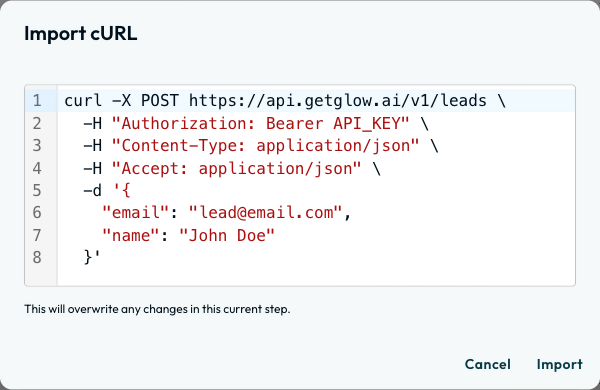
1. POST JSON + Bearer Auth
curl -X POST https://api.example.com/v1/leads \
  -H "Authorization: Bearer {{ $secret.API_KEY }}" \
  -H "Content-Type: application/json" \
  -H "Accept: application/json" \
-d '{"email": "[email protected]", "name": "Ada Lovelace"}'What it passes on
The response sits under ret. When an API returns a JSON list (including a list with one entry), ret stays a list, so read the first item with an index such as {{ 3.ret.0.id }} (or {{ 3.ret.body.0.id }} when Include Full Response is on). An outbound summary sits under request ({ method, url, headerNames, bodyBytes }, without header values). When Pagination is enabled, {{ 3.ret }} holds the merged array and {{ 3.pagination }} reports { pagesFetched, totalItems, hasMore }.
| Response Mode | JSON Field Path | Raw Text / Binary Path | Status & Headers | Outbound Request Summary |
|---|---|---|---|---|
| Default | {{ 3.ret.id }} | {{ 3.ret.data }} | Not included | {{ 3.request.method }}, {{ 3.request.url }} |
| Include Full Response | {{ 3.ret.body.id }} | {{ 3.ret.body }} | {{ 3.ret.status }}, {{ 3.ret.headers }} | {{ 3.request.method }}, {{ 3.request.url }} |
JSON Response (Default)
{
  "ret": { "id": 1042, "title": "Invoice #1042", "status": "paid" }
}
Read fields as {{ 3.ret.id }} or {{ 3.ret.status }}.
Troubleshooting & Error Handling
Non-2xx status codes (400, 500) stop the Step by default:
| Setting / Code | How to Handle It |
|---|---|
| Ignore HTTP Status Errors (4xx/5xx) | In Advanced Options: treats non-2xx responses as passing and populates ret. Pair with Include Full Response to branch. |
| Retry on fail / Error Path | In Test & Debug: retry transient network errors or route transport/timeout failures to an Error Path. |
| 401 Unauthorized / 403 Forbidden | Check your header credentials (401) or API resource permissions (403). |
| 404 Not Found / 429 Too Many Requests | Check dynamic URL tokens (404). For 429 waits over 15 seconds, reduce concurrency or enable Error Handling retries. |
Top Real-World Recipes
1. Post Lead / CRM Record
Method: POST · URL: https://api.yourcompany.com/v1/leads · Auth: Bearer Token ({{ $secret.CRM_API_KEY }}).
{
  "email": "{{ 1.email }}",
  "first_name": "{{ 1.first_name }}",
  "company": "{{ 1.company_name }}",
  "source": "glow_workflow"
}- Run
- Open Test & Debug on the HTTP Request Step and click Run step
- You should see
- The Output tab shows the parsed response under ret (and request metadata showing the sent method and URL with secrets masked).
What’s Next?
- Parse JSON: Turn raw text or nested strings into addressable fields.
- Error Handling & Retries: Configure automatic retries on 429/5xx status codes.
- Secrets & Variables: Securely manage API tokens and environment endpoints.