MCP Administration
Set workspace MCP budgets, governance ceilings, and billing safeguards in Team settings → MCP. To connect ChatGPT, Claude, Gemini, or an IDE, see Connecting AI Apps & Editors.
- Use it to
- Set daily Step credit and Glow AI token caps for MCP, pause billable MCP runs, and govern external MCP agent tool servers
- Find it
- Workspace menu → Team settings → MCP (?section=mcp) and Connections → Agent tools
- Cost
- MCP reads, authoring, and validation are free · MCP test runs and AI generation use workspace Step credits or Glow AI tokens
- Limits
- Up to 25 active MCP connections per user · Selected-automation allowlists cap at 100 automations · Daily caps reset at 00:00 UTC
- Instead
- Connecting AI Apps & Editors (for personal client setup and scoped token creation)
- ChatGPT, Claude, Gemini, and AI editors connect to Glow via OAuth 2.1 or personal tokens.
- Admins set workspace ceilings, Live change policies, and daily caps in Team settings → MCP.
- Tests and Assistant builds use shared workspace Step credits and Glow AI tokens.
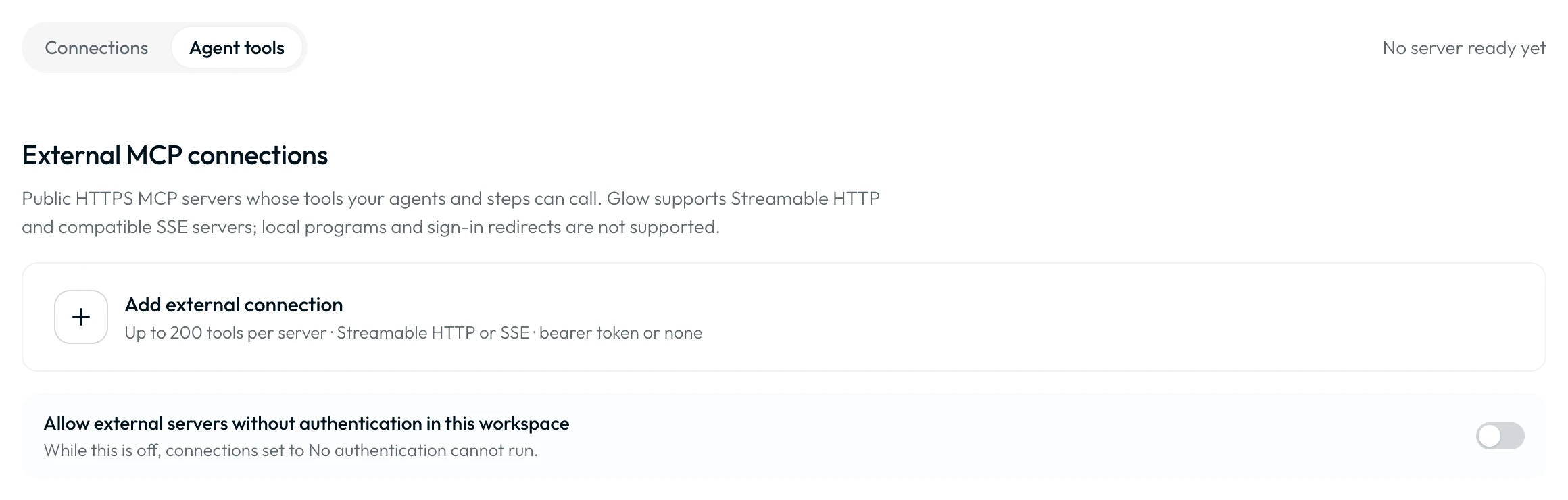
- AI Agent Steps call external HTTPS MCP tool servers during automation runs.
- Configured under Connections → Agent tools → Add external connection.
- Governed by Admin tool catalogue approval and per-tool human review gates.
Set Up Workspace Access
Admins, Managers, and Members can open Team settings → MCP → My MCP connection to manage personal connections. Only a workspace Admin can change workspace governance and billing safeguards.
Open the workspace’s MCP settings
Open the workspace menu, choose Team settings, and select MCP.
Review usage and limits
Under MCP from your own tools, review the three cards showing today’s MCP usage and workspace balances.
Save the safeguards
Set workspace governance, Allow billable MCP runs in this workspace, and daily limits. Click Save changes.
Workspace Safeguards & Governance Ceilings
| Control | What to Set |
|---|---|
| Pause all MCP in this workspace | Block all MCP reads, writes, and tests (403 MCP_PAUSED) and hide the workspace from list_workspaces until resumed. |
| Maximum MCP permission | Cap what any connection can do in this workspace (Read only, Build drafts, or Full access). |
| Allow Live changes / Require approval | Under Full access, control whether connections may edit, publish, or pause Live automations, or Require approval for Live changes and test secrets. |
| Allow billable MCP runs in this workspace | Allow or refuse new billable MCP tests and Assistant builds without disconnecting clients. |
| Daily Step credits limit | Choose No additional limit or Custom limit (whole-number daily cap on MCP Step credits). |
| Daily Glow AI tokens limit | Choose No additional limit or Custom limit (whole-number daily cap on MCP Glow AI tokens). |
Setting a custom limit to 0 blocks new billable work for that unit while free MCP operations (update_workflow, validate_workflow, save_workflow_version, and history reads) continue. Daily limits reset at 00:00 UTC ("Outstanding reservations keep counting after the reset"). Review changes under Settings history or click Discard changes.
Review Usage
MCP and the web app share the workspace’s Step credits and Glow AI tokens. Click View usage in Billing and usage for balance details.
- Workspace and catalog discovery (list_workspaces, list_workflows, search_components, get_step_context).
- Direct canvas authoring and validation (create_workflow, update_workflow, validate_workflow, validate_step_config).
- Run traces, history, and version checkpoints (get_workflow_execution, save_workflow_version, diff_workflow_versions).
- Single-Step and whole-automation tests in execute mode (test_step, run_workflow_test).
- Legacy asynchronous Assistant builds (generate_workflow, chat_edit_workflow).
- Trigger sample fetches, pinned Steps, and writeMode: "preview" cost 0 Step credits.
See billing response fields and test costs and effects. Tests perform real actions and can incur usage.
Review Token Permissions
OAuth grants and personal tokens (glow_mcp2_…) narrow existing workspace access and never elevate role permissions. Prefer Only {Workspace}. All my workspaces requires Admin access in every reachable workspace.
| Permission Level | Tools in tools/list | Grants Included |
|---|---|---|
| Full access | 25 (26 with Manages Live) | Read all automations and runs, build/edit drafts, run test_step and run_workflow_test on drafts and Live, and write Data Store test access by default. |
| Build drafts (Recommended) | 25 (22 on legacy no-test) | Default for new tokens, OAuth sign-in, and Quick Connect. Read all automations, create/edit drafts, and test drafts (read Data Store test access). |
| Read only | 16 | Inspect automations, schemas, and run history without modifying or running anything (read Data Store test access). |
- Lifecycle & expiry: Keep up to 25 active OAuth app and
glow_mcp2_…token connections per user, or click Pause all in Your account → MCP. Connections expire 90 days after creation or renewal, or after 30 idle days (with a 7-day email warning and Renew). - In-place controls (
Change permissions): Update a connection’s preset, Data stores test level (None,Read,Write), workspace scope, or Limit to specific automations allowlist (100 automations max). Start a new chat afterwards so your client refreshestools/list. - Secrets & Live edits: Toggle Allow tests to use workspace secrets (
Tests use secretsbadge) or Manage Live automations (Manages Livebadge, Admin only). Editing or publishing a Live automation (update_workflowwithallowActiveWorkflowMutation: trueorset_workflow_status) requires Full access, Manage Live automations, workspace Allow Live changes, and Admin role. See Create a Scoped Token or Authorize an App.
Troubleshoot Workspace MCP
| Problem | Next Action |
|---|---|
| MCP setup is unavailable in a workspace | Personal MCP setup and Team settings → MCP require an Admin, Manager, or Member role (Viewers cannot use MCP). |
New billable work returns MCP_PAUSED | Check Pause all MCP in this workspace and Allow billable MCP runs in this workspace in Team settings → MCP, or user Pause all. |
Billable test returns MCP_ENFORCEMENT_UNAVAILABLE | No run started or was charged. Verify workspace safeguards or use writeMode: "preview". |
| A token or permission check fails | Follow client troubleshooting. |
| A test response is lost | Follow Step recovery or whole-run recovery. |
External Tools for AI Agents
Review Connections and Approval
Register external HTTPS MCP servers under Connections → Agent tools → Add external connection. Approve the tool catalogue and configure per-tool human approval gates.
Developer Guide Shortcuts
Review connection directions, credential isolation, and execution grants.
Architecture & GovernanceConnect ChatGPT, Claude, Gemini, or an IDE and manage permissions in place.
Connecting AI Apps & EditorsDiscover components in batches, apply atomic canvas edits, and validate graphs.
MCP Tool ReferenceRun single-Step or whole-automation tests in preview or execute mode.
Testing and Recovery- Run
- Open Team settings → MCP (?section=mcp) and set a daily Step credit or Glow AI token limit
- You should see
- The workspace cap is saved immediately and appears in Settings history.
What’s Next?
- Connecting AI Apps & Editors: configure a client once workspace access and budgets are ready.
- Glow as an MCP Client: connect external tools for AI Agents.
- Usage Controls & Recovery: review the workspace’s wider billing safeguards.