Human Review
Pause an automation and email a reviewer for a decision before running downstream Steps.
- Use it to
- Require a person's sign-off or form input before an irreversible action
- Find it
- Tools → Flow → Human Review
- Cost
- Free (0 Step credits while suspended)
- Limits
- Up to 13 days (1,123,200 seconds) expiry window
- Output
- {{ N.result.decision }}, {{ N.result.respondedBy }}, {{ N.result.formData.field }}
- Instead
- Wait (when pausing for a timer or external webhook without a reviewer)
Use Human Review before irreversible actions such as releasing refunds, publishing AI-drafted replies, deleting records, or escalating VIP accounts.
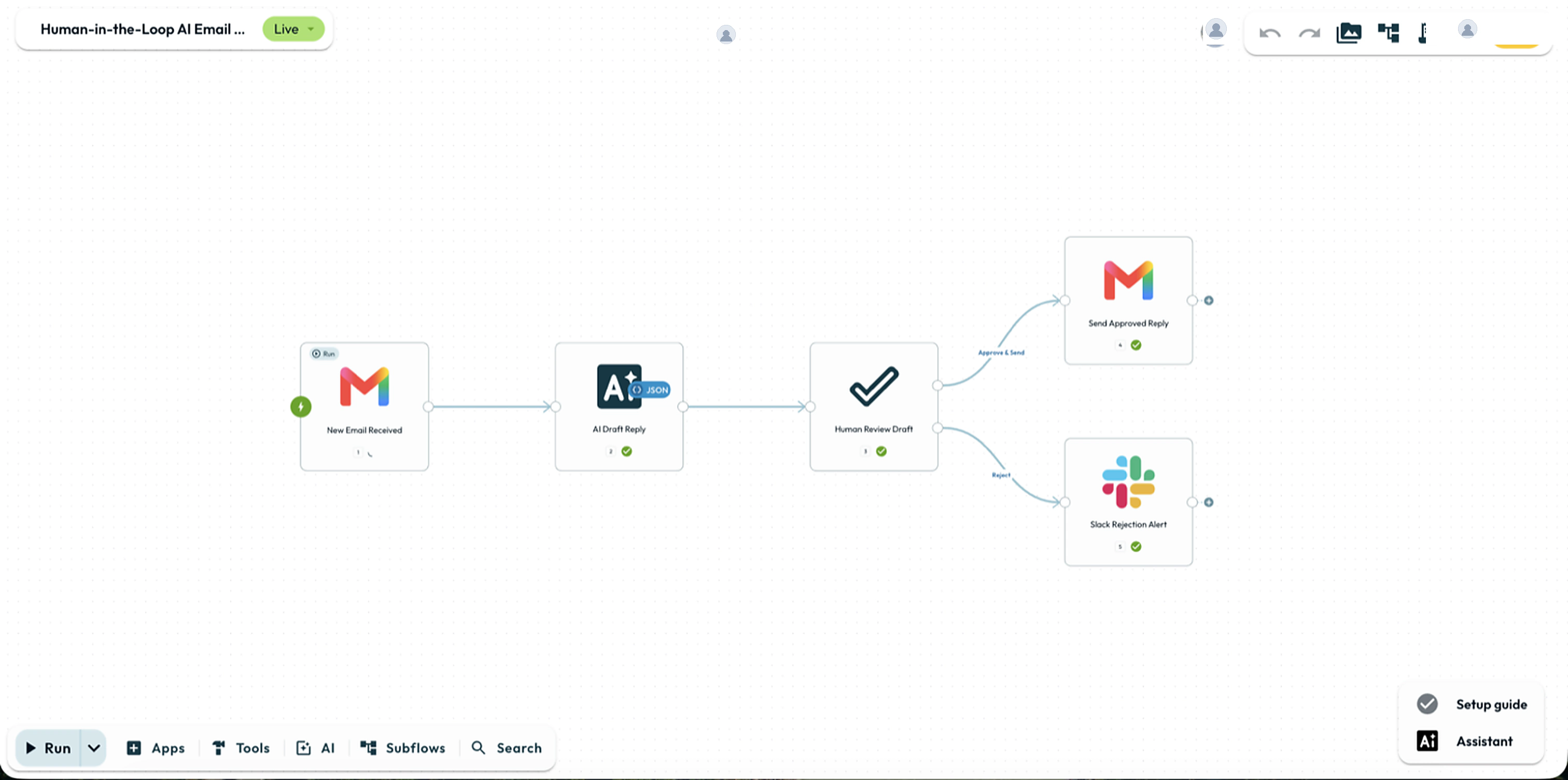
The Review Lifecycle
When a run reaches Human Review, Glow emails the reviewer, records the request, and suspends execution. Downstream Steps wait for a confirmed decision or deadline expiry.
- Receives the email notification at Approver Email (one address or a shared team alias).
- Clicking a decision button opens /app/reentry with that choice pre-selected.
- Two-step confirmation stops email security scanners from triggering decisions.
- Must sign in as a workspace member with permission to view the automation.
- Share private (Me only) automations with the reviewer before running.
- First confirmed decision claims the run. Later clicks see the Answered screen.
Setting It Up
Add Human Review from Tools → Flow on the canvas dock. Only Approver Email is required.
1. Core Fields
| Field | Required | Description |
|---|---|---|
| Approver Email | Yes | Single destination email address (comma-separated lists are rejected). |
| Email Subject | No | Notification subject (defaults to "Action required: approve workflow"). |
| Message | No | Reviewer instructions (supports {{ }} references). |
| Context Data | No | Key-value rows rendered as a summary table in the email and portal. |
| Decisions | No | Outcome buttons (defaults to Approve and Deny). |
| Expire after (seconds) | No | Deadline up to 13 days (1,123,200 seconds). Blank or 0 waits without timeout. |
| Form Title / Fields | No | Optional heading, description, and inputs completed before confirming. |
What the Approver Sees
Clicking an email button opens /app/reentry with that choice pre-selected. The reviewer inspects the context, fills any required form fields, and clicks Confirm in any desktop or mobile browser.
| Portal State | What the Reviewer Sees | Cause |
|---|---|---|
| Pending | Active review screen with context and form. | Waiting for a response. |
| Answered | “This request has already been answered.” | A teammate already submitted a decision. |
| Expired | “This request expired.” | Expire after deadline elapsed. |
| Forbidden | “You don’t have access to this workflow.” | User is not a member or cannot view the workflow. |
| NotFound | “This link is no longer valid.” | Execution or Step was deleted. |
Downstream Reference Data
Steps before Human Review have already executed. Once confirmed, the run resumes with {{ N.result.decision }} ("approved" / "denied"), {{ N.result.formData.<name> }}, {{ N.result.answeredAt }} (ISO UTC), and {{ N.result.status }} ("answered"). Both {{ N.result.decision }} and {{ N.result.formData.<name> }} are offered in the variable picker before the first run (earlier {{ N.formData.<name> }} references without result are flagged by validation):
{
  "result": {
    "status": "answered",
    "decision": "approved",
    "answeredAt": "2026-09-23T14:32:10.512Z",
    "formData": {
      "approvedAmount": 450,
      "reviewNotes": "Verified against quarterly budget."
    },
    "approverEmail": "[email protected]",
    "subject": "Action required: approve refund",
    "expiresAt": "2026-09-24T14:00:00.000Z"
  }
}
How to Test & Limits
Keep the automation in Draft
Use safe test destinations and set Approver Email to your own address. Draft runs send real emails and run downstream Steps once confirmed.
Trigger and confirm
Click Run in the dock, open the email link, fill any form fields, and click Confirm.
Verify the branch
Check Executions to confirm the run followed the chosen decision handle.
Testing via MCP & Limits. test_step refuses Human Review Steps
(invalid_argument). Use run_workflow_test instead (if waitSeconds
elapses first, the run cancels with timeout). Maximum expiry is 13 days
(1,123,200 seconds). Approver Email takes a single address.
Practical Examples
1. High-Value Financial Refund
- Webhook (Step 1) receives
amountandcustomer_emailwith Body only enabled (or under{{ 1.body }}). - Conditions (Step 2) checks
amount > 500, routing matches to Human Review (Step 3) and ELSE to the refund Step. - Human Review (Step 3) emails
[email protected](Expire after:86400, Context Data:CustomerandAmount, Decisions:Approve/Deny, plus areasonfield). - Wire
approvedto Stripe: Create Refund anddeniedto Gmail: Send Email.
- Run
- Click Run step in Test & Debug with a simulated decision (or trigger a draft run and click Approve in the review link)
- You should see
- The run resumes down the chosen decision branch and {{ N.result.decision }} equals the selected outcome key.
What’s Next?
- Wait Step: Pause for a timer or external webhook.
- Conditions: Route executions before or after human checkpoints.
- Stop and Error: Terminate runs along rejection or expired paths.